Key takeaways
- Microsoft Fabric zero-provisioned (F0) capacity and on-demand billing were announced at FabCon Europe 2026 and are in preview.
- “Zero-provisioned” means no upfront compute commitment — you pay for the compute your supported workloads actually consume.
- On-demand billing works per billing category (e.g. Data Warehouse) and can also be enabled on F2+ capacities, with a spend limit.
- It’s ideal for pilots and bursty workloads; steady, always-on workloads are usually still cheaper on reserved capacity.
One of the most interesting cost announcements from FabCon Europe 2026 was a new way to pay for Microsoft Fabric: zero-provisioned F0 capacity, with on-demand billing. It removes the biggest barrier to trying Fabric — having to buy and pay for compute up front — and it changes the maths for small and bursty workloads. Here is what it is and how it helps you spend less.
What is zero-provisioned (F0) capacity?
Normally, Microsoft Fabric runs on an F SKU you buy in advance: you provision a fixed amount of compute (capacity units), and every workload draws from it whether or not it is being used. F0 flips that around. There is no upfront compute-capacity charge — you simply pay for the compute your supported workloads consume. Your data in OneLake is still billed separately as storage.
How it differs from a normal F SKU
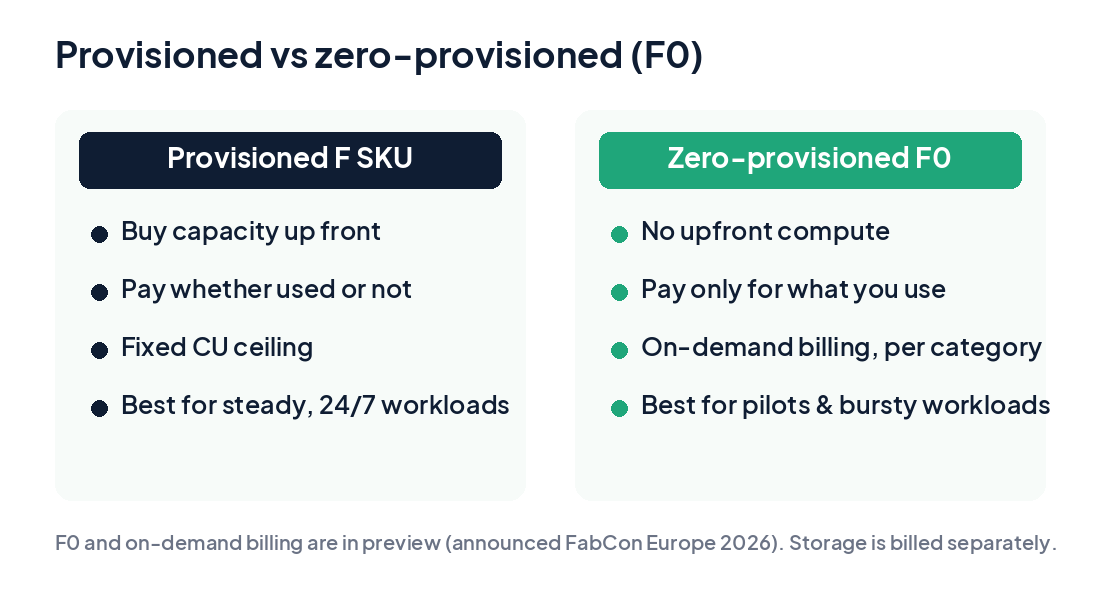
With a standard F SKU you pay for fixed capacity in advance — which can mean paying for idle compute during a pilot or a sporadic workload. With F0 and on-demand billing you pay for what you consume. On-demand billing extends the consumption model that Autoscale Billing already uses for Spark to more Fabric workloads.
On-demand billing, per category
A key detail: on-demand billing is applied per billing category, not per workspace. For example, you could move Data Warehouse to on-demand billing while Data Factory keeps running on your shared capacity. That lets you isolate a spiky workload so it bills on its own usage — and doesn’t throttle everything else on the capacity. (Microsoft hasn’t published the full list of supported categories yet, so confirm coverage when it’s released.)
You can use on-demand billing on F2+ too
You don’t have to be on F0. On an existing F2-or-higher capacity, the capacity administrator can turn on on-demand billing for a supported category:
- Open the capacity’s Details tab.
- In the On-demand billing section, enable the billing category to move outside the shared CU limit.
- Set a spend limit for that category, expressed in CU-hours over a rolling 24-hour window.
A new On-demand compute tab in the Capacity Metrics app shows consumption per category — useful for chargeback and keeping finance happy.
Who it’s for
- Teams exploring Fabric for the first time, or running a pilot or proof of concept.
- Small teams with limited, sporadic workloads.
- Bursty workloads — seasonal spikes that would otherwise force you to oversize the whole capacity.
How it helps reduce cost
- Removes the upfront commitment for pilots and small deployments.
- Bills bursty workloads on actual demand rather than peak sizing.
- Isolates spiky categories so one workload doesn’t throttle the rest.
- Lets finance set a spend ceiling and verify usage against it.
The caveats
- It’s in preview — timelines may change, and it isn’t recommended for production commitments yet.
- Pricing isn’t published — on-demand multipliers and F0 rates haven’t been released, so exact costs can’t be quoted.
- Partial workload support — only supported billing categories qualify.
- Power BI licensing is unclear on F0 — assume Power BI Pro is still needed to share content below F64 until Microsoft confirms otherwise.
- It’s not the same as capacity overage, which bills compute above the SKU at three times the pay-as-you-go rate when throttling occurs.
How F0 fits your cost strategy
For context, the smallest always-on F2 is roughly $263 per month on pay-as-you-go in US regions (before storage and licensing), and reserved capacity is about 41% cheaper than pay-as-you-go. So the rule of thumb holds: steady workloads stay cheapest on reserved capacity, predictable idle time is best handled by pausing capacity, and bursty or early-stage workloads are where zero-provisioned F0 and on-demand billing shine. The smart move is to use all three where they fit.
Planning a move to Fabric? Explore our Microsoft Fabric consulting in the UAE — strategy, adoption & architecture, migration and end-to-end implementation.
Further reading: Microsoft Fabric zero-provisioned (F0) capacity (Smartbridge), plus Microsoft’s Fabric capacity documentation.
Frequently Asked Questions
What is Microsoft Fabric F0 (zero-provisioned) capacity?
A new Fabric capacity tier announced at FabCon Europe 2026 and currently in preview. It requires no upfront compute provisioning — you pay for the compute your supported workloads actually consume, with OneLake storage billed separately.
How is F0 different from a normal F SKU?
A standard F SKU is provisioned and paid for in advance, whether used or not. F0 has no upfront compute charge and bills on demand for what you consume, which makes it ideal for pilots and bursty workloads.
What is on-demand billing in Microsoft Fabric?
A consumption model where a supported billing category is billed per usage instead of drawing from a provisioned capacity’s fixed CU limit. It is on by default on F0 and can be enabled per category on F2 and higher capacities, with a spend limit.
Who should use Fabric F0 and on-demand billing?
Teams piloting Fabric, small teams with sporadic workloads, and organisations with bursty or seasonal spikes that would otherwise oversize a whole capacity. Steady, always-on workloads are usually cheaper on reserved capacity.
Is Fabric F0 available now?
It is in preview (coming soon) as of FabCon Europe 2026, and pricing has not been published yet. Plan your baseline on current pay-as-you-go and reserved rates, and test on-demand billing when the preview is available.